Hello,
is there a way to map fields between Specify7 and Darwin Core?
The field “rightsHolder” in Darwin Core to which field can be mapped in Specify7?
Thank you in advance
Hello,
is there a way to map fields between Specify7 and Darwin Core?
The field “rightsHolder” in Darwin Core to which field can be mapped in Specify7?
Thank you in advance
Hi @elenimou,
Thanks for your question! Yes, there is a way to map Specify fields to Darwin Core. This is part of the exporting and data publishing setup that is described in this guide:
Field mappings are per export mapping (per query), so they are not globally applied to all collections.
For example, you can map terms like license, accessRights, or basisOfRecord to fields in a table (like the ‘Institution’ table) as this will be the same for all records:
<field term="http://purl.org/dc/terms/license" stringId="1,23,26,96,94.institution.copyright" oper="8" value="" isNot="false" isRelFld="false"/>
<field term="http://purl.org/dc/terms/accessRights" stringId="1,23,26,96,94.institution.termsOfUse" oper="8" value="" isNot="false" isRelFld="false"/>
<field term="http://rs.tdwg.org/dwc/terms/basisOfRecord" stringId="1,23.collection.collectionType" oper="8" value="" isNot="false" isRelFld="false"/>
You could add a value you wish to use for the rightsHolder term to the ‘Institution’ table and include it in your mapping! This could simply the the institution.Name field. 
Thank you very much for the prompt and informative response. Unfortunately, it was not what I was looking for; evidently I did not provide all the necessary information correctly.
I am at an early stage in using Specify. Specifically, I have a spreadsheet with fields from the Darwin Core and I am trying to create the mapping through the WorkBench of Specify 7.
My material concerns geological fossils, and I have not found a way to match (map).
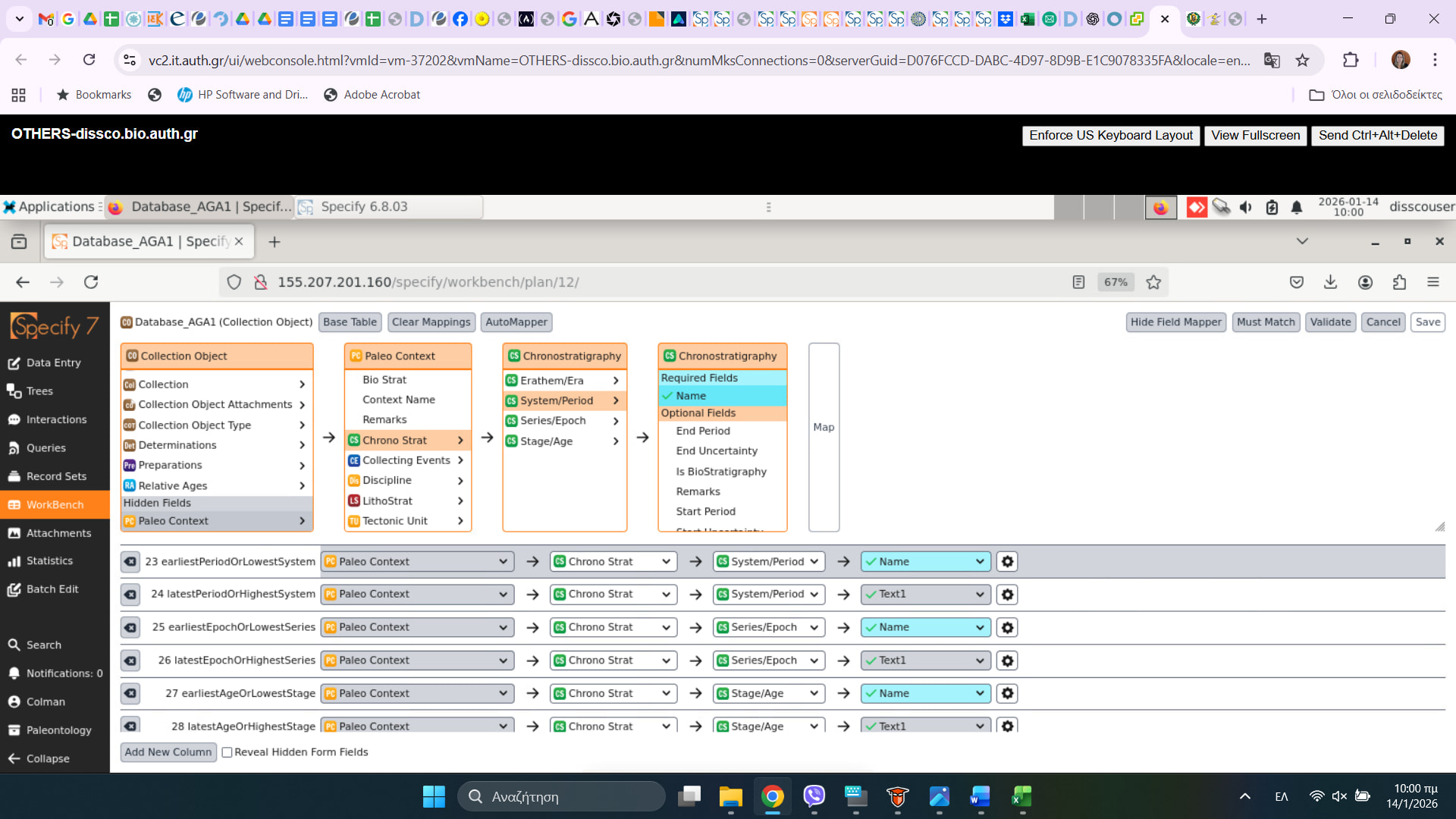
Here are some that I have already mapped.
I’m using a Specify Model Diagram (Overwiew) which is very helpful, but I can not find a way to map fields like: earliestPeriodOrLowestSystem (eg Quaternary…etc) or earliestEpochOrLowestSeries (eg. Lower Pleistocene…etc) or materialSample (eg. tibia, radius …etc).
I am trying to map my Darwin Core field to Specify 7 not the other way around.
Than you again
E.
Hello @elenimou ,
Thank you for clarifying!
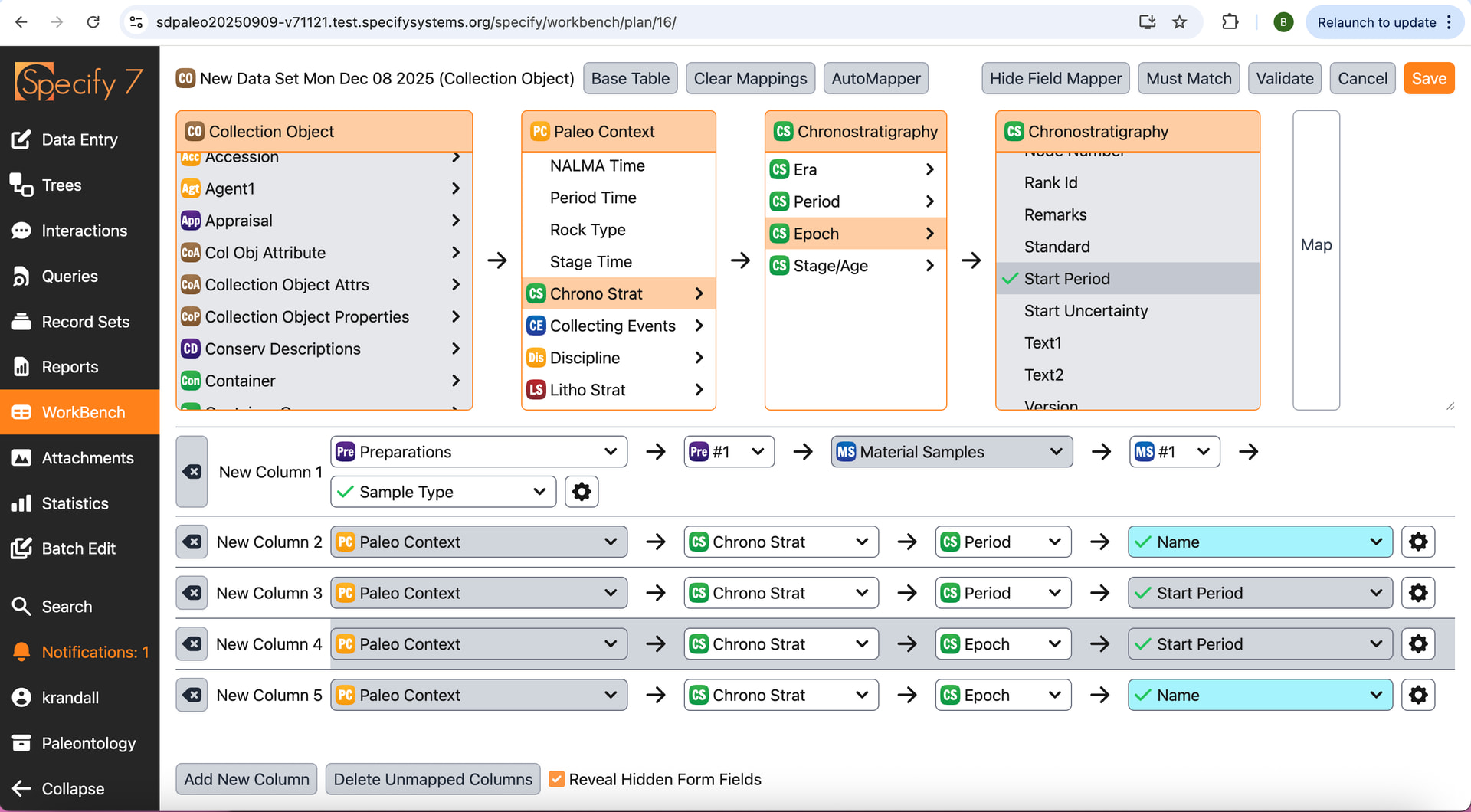
Here is what the fields you mentioned would look like while mapping -
| Darwin Core Field | Table | Target Field |
|---|---|---|
earliestPeriodOrLowestSystem |
PaleoContext > Chronostratigraphy | Period →Start date |
earliestEpochOrLowestSeries |
PaleoContext > Chronostratigraphy | Epoch → Start date |
materialSample |
Preparation > Material Samples | Type |
And here is the what the mapping for the terms you mentioned would look like in WorkBench. Material samples can be mapped to the MaterialSample table via Preparations table. And earliestPeriodOrLowestSystem or earliestEpochOrLowestSeries can be mapped in Chrono Strat within Paleo Context.
Something to note is that these tables are Hidden and you will need to check the ‘Reveal Hidden Form Fields’ box at the bottom of the webpage.
We are in the process of formalizing our documentation for Specify mapping to DwCA workflow. While the official guide isn’t ready for release, I’d be happy to assist with any specific terms or mapping directly.
For your reference, here is documentation on the WorkBench and its functionality: The Specify 7 WorkBench
I hope this helps!
What about LatestPeriodOrHigherSystem? I can not select “Name”again (i tried and the system crushes).
Can I select “text1” instead?
E.
Hello @elenimou,
For LatestPeriodOrHigherSystem, the field would be :paleocontext: Paleo Context → :chronostratigraphy: Chronostratigraphy → :chronostratigraphy: Period → :chronostratigraphy: End Period.
Could you please share the upload plan so I can see what the whole thing looks like and investigate the issue you are having with material samples? To do this, go to your WorkBench data set, click Tools and then click Upload Plan. Then, copy the code and include it in a reply here. Thanks!
Thank you very much for your help.
Unfortunately, if I select “start period”, it finds errors during validation.
I can not find “Tools” in my “WorkBench data set”
Many thanks in advance
E.
Hello @elenimou ,
Thank you for your patience!
You can find tools button on the WorkBench mappings page. You will see an icon (see screenshot below) next to Meta Data button on top left. Click the Upoad plan and copy the code and include it in a reply here.
Thanks!
Thank you so very much for your answer.
Elena