We are new to the Specify community, and, as part of the DiSSCo program, we expect to receive our dedicated equipment for Specify 7 in the next few weeks, specifically a large-capacity physical server that will host collection data, photographs, and media.
In the last couple of months, we have been working intensively with Specify 7 Version v7.10.2.3 on a pilot computer to import specimen information via Workbench and have completed the mapping for all our collections.
We encountered an issue concerning the taxon trees during the installation process. When we try to create discipline/collection utilizing the wizard in Specify 6, we are given the option to import the Catalogue of Life 2021 tree during the installation process. There seems to be an error, and the process of collection creation is not properly completed (when we uncheck the taxon tree box, the process runs smoothly).
Since the process of adding the Catalogue of Life tree is not working for us, we decided to create our own trees or import ready-made ones via Workbench. However, we would like your feedback on the particular issue. What is the best practice for taxon trees? We would appreciate your guidance.
Welcome to the Speciforum! We are glad to have you here! Thank you very much for your question.
I have provided guidance on the format required for building a tree in Specify here:
The official repository for the tree files available in the Specify 6 Wizard can be found here. This includes the dataset that caused the error when building the database in that version:
Specify 6 may struggle with the larger taxon trees available from the Catalogue of Life by default. Specify 7 handles tree importing much better. However, you will need to download the appropriate tree from this site and map it to the columns in your Taxon tree.
Hierarchy
The most important principle to understand is that all trees in Specify (Taxonomy, Geography, Storage, etc.) are fundamentally hierarchical. Every record, or “node,” in the tree must have a parent node, except for the highest-level “root” nodes. When you upload a tree from a file, you are essentially providing a set of instructions that tells Specify how to build these parent-child relationships.
File Formatting for Upload
To create a taxonomic tree in Specify, you must generate a spreadsheet (typically a .csv, .tsv, or .xlsx) where each row represents a complete path from the highest rank down to the lowest rank for that particular entry, including authorship and any other details at each level. This will be imported using the WorkBench.
The columns in your spreadsheet should correspond to the ranks in your taxon tree definition (e.g., Kingdom, Phylum, Class, Order, Family, Genus, Species). The critical rule is that for every row, you must include the data for all preceding higher-level ranks.
Here is an example of a correctly formatted file. Notice how the higher-level ranks are repeated for each subsequent child row.
When Specify processes this file, it reads each row and builds the tree structure. For example, the last row tells the system: “The species changamwensis belongs to the genus Boulengerula, which belongs to the family Herpelidae,” and so on. If a node like Herpelidae has already been created by a previous row, Specify will simply link to the existing node instead of creating a duplicate.
Including Other Data
Your data set is not limited to just the names of the ranks. You can include any other fields that belong to the Taxon table, such as the author, source, or common name. You simply need to add more columns to your spreadsheet with headers that match the field names in Specify. In the example above, species author and species source are mapped to the corresponding fields for the taxon record at the species level.
Indeed, we could not import the default taxon trees through Specify 6.
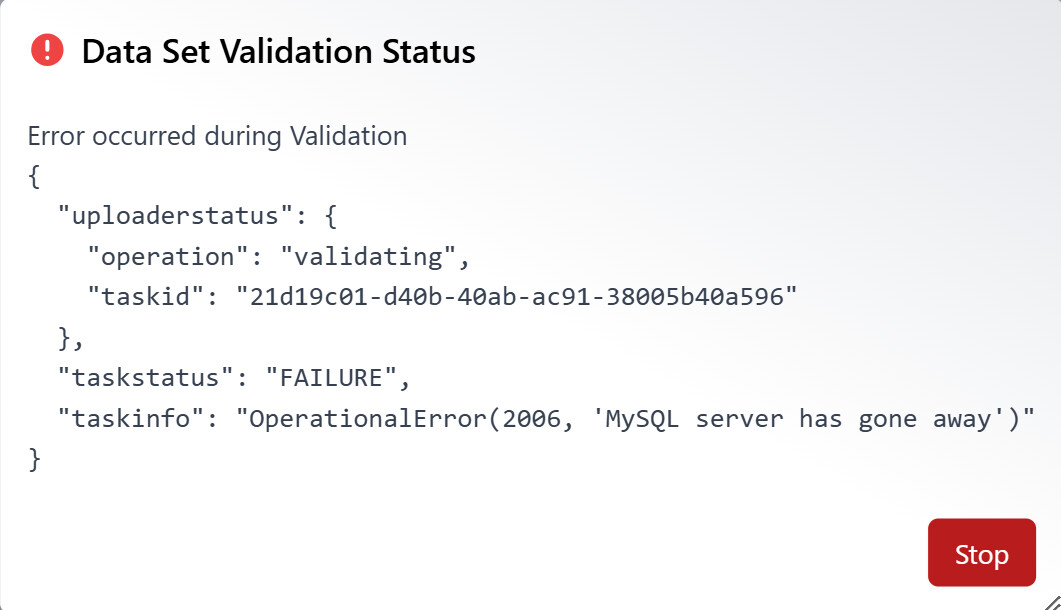
We followed the instructions about importing taxon trees in Specify 7, specifically we tried to import col2021_aves.xlsx, and there seems to be a validation error when we import the file
via Workbench, therefore we had to stop the upload process. Is there a way to configure this? On the other hand, it seems to be working fine though with the older file version col2008_aves.xls.
By the time we have the taxon trees uploaded on the database, in case we want to enter new species, is it necessary that we provide all relevant information for the taxon tree in the excel file columns (e.g. kingdom, phylum, class, etc), or by just defining the Species name, the record can match automatically to the exact tree node?
Apologies for the delay, I was out of the office until today this week.
This issue can happen if your IT administrator has not increased the database timeout and maximum allowed data set size at the MariaDB level.
We have instructions on how to solve this here:
Once this change is made, you should be able to proceed with the upload once this adjustment has been made!
By the time we have the taxon trees uploaded on the database, in case we want to enter new species, is it necessary that we provide all relevant information for the taxon tree in the excel file columns (e.g. kingdom, phylum, class, etc), or by just defining the Species name, the record can match automatically to the exact tree node?
Once the taxon trees are uploaded, you will need to include higher-level taxonomy, but not the entire structure. For example, if you want to match existing genera or species, you can simply add the relevant columns:
Just to let you know, we’re not very familiar with Debian Linux, and we couldn’t locate the my.cnf file on the server. However, since our setup uses a Dockerized MariaDB instance, we were wondering if updating the docker-compose.yml file would work.
Specifically, if we replace --max_allowed_packet=1073741824
with --max_allowed_packet=1024M,
would that be the correct way to apply the change?
We followed the instructions step-by-step; however, we regret to inform you that increasing the max_allowed_packet value to 1024M is still not working on our side. We created the mariadb.cnf file and updated the docker-compose.yml accordingly, both located in the same directory (/user/.git/all-in-one/). When attempting to start the docker-compose services, we continue to receive errors such as “command not found” or “no configuration file provided.”
We would also like to kindly remind you that we are currently working on a temporary pilot machine until we receive the dedicated physical server for Specify 7. As mentioned previously, we have limited experience with Debian Linux Server, so we may require additional technical support while we address configuration-related issues.
Would it be possible to arrange a remote login session so that we can resolve the issue with the taxon trees? Even though we have not yet received the final equipment for Specify 7, it is important for us to be able to import taxon trees into our collections.