PrepType picklist and Specifycloud.org stats traffic issue

Hi,
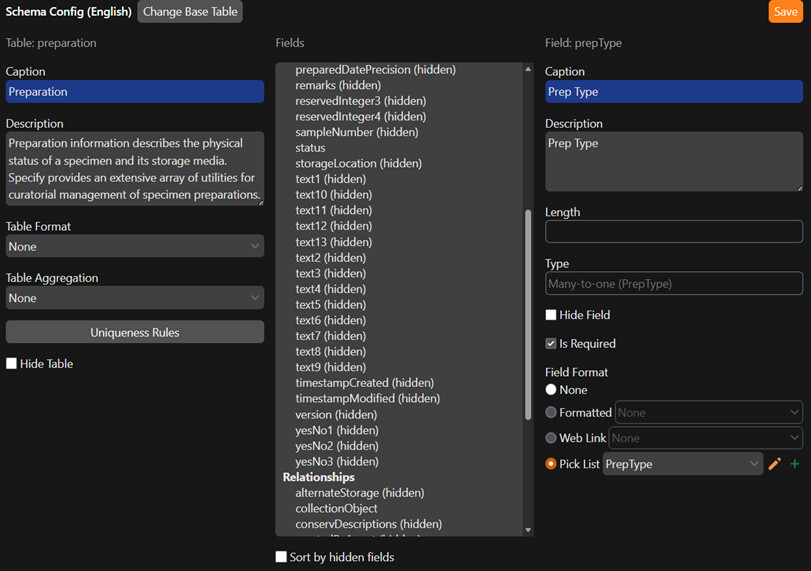
I’m currently trying to debug why the PrepType picklist in Preparations works in one of my Specify 7 instances but not in another. One instance is always displaying a “loading” message.

While investigating, I also noticed that my locally hosted Specify 7 instances are continuously attempting to send data to https://stats.specifycloud.org. I’m not sure whether this is related to the PrepType issue, but I wanted to ask if there’s a way to disable this noisy outbound traffic.

Below, I’ve included a comparison between a working and a non-working PrepType picklist.
Any help in understanding what might be going on would be greatly appreciated.
Thanks!

Functional PrepType picklist:


image


Non-functional PrepType picklist (only displays “Loading” message):


image


Specify 7 System Information: (see attached file for complete system info)


Specify 7 System Information - 2026-03-19T14_52_14.378Z.txt (340.7 KB)

Hi @Heryk,

Thank you for reaching out! Your detailed explanation was very helpful in diagnosing this issue. :grinning_face_with_smiling_eyes:

PrepType Issue:

I believe your problem is the same as reported in issue #7490.

Essentially, a loop is formed when the name field on the PrepType table is linked to the “PrepType” pick list in Schema Config and the prepType field on the Preparation table is also connected to the same pick list. That loop is what causes the persistent loading state of the field.

Solution:

Choose the PrepType base table in Schema Config. Here, select the name field and ensure that ‘None’ is selected under the Field Format section.

Statistics Traffic:

The traffic you are seeing to https://stats.specifycloud.org is part of Specify 7’s anonymous usage reporting. This system is designed to provide the Specify Collections Consortium (SCC) with high-level, non-sensitive telemetry (such as version numbers and basic usage statistics) to help the development team prioritize features and understand the reach of the software.

If you are in a high-security environment or simply want to reduce “noisy” outbound logs, you can disable this by modifying your configuration.

For Docker Installations

The most direct way to handle this in a Docker-based setup is to override the statistics URL in your environment settings. You can add the following environment variables to your docker-compose.yml (or your .env file) for the specify7 and specify7-worker services:

YAML

# In your docker-compose.yml under 'environment':
- STATS_URL=
- STATS_2_URL=

By setting these to empty values, the application will no longer have a destination for the telemetry data.

For Manual/Local Installations

If you are managing a specify_settings.py file manually, you can add or modify these lines:

Python

# Python specify_settings.py
STATS_URL = None
STATS_2_URL = None

[!important] Note: After making these changes to your Docker configuration or settings file, you will need to restart your containers (e.g., docker-compose up -d) for the changes to take effect.

1 Like

Hi @bronwynscc,

Thanks for following up! Your PrepType base table workaround resolved my issue… much appreciated.

Regarding the stats traffic: we’re operating in a high-security environment, so that type of traffic is blocked and not permitted. I tried both of your suggested methods to disable it:

  1. Adding “STATS_URL=” and “STATS_2_URL=” to the Specify environment variables

  2. Adding “STATS_URL = None” and “STATS_2_URL = None” to specify_settings.py

Unfortunately, the stats traffic is still active in both cases. I’m currently using Specify version 7.11.3. Is it possible there was a change or issue related to stats in this version? I noticed the release notes mention “enhanc[ing] the reporting of database content statistics,” but I haven’t been able to find any additional details.

Source: Specify 7.11.3 Release Announcement - Announcements & News - Specify Community Forum

Thanks

UPDATE — Good news! :tada:

The changes to specify_settings.py worked perfectly. After clearing the browser cache and applying the fix you suggested, everything started working as expected. No more stats traffic! Thanks!

Cheers!

2 Likes

This topic was automatically closed 7 days after the last reply. New replies are no longer allowed.