Dear Specify team,
I am having some difficulty implementing the Collection Relationships feature for my institution.
Within the hierarchical scope of my institution, I have numerous collections that are often scattered across different disciplines. However, for two of these collections—Historical Context and DNA & Tissue—I would like to create and use the Collection Relationships tool.
How can I set up the Historical Context collection so that it is linked to all the other collections in my institution, even if they are not in the same disciplines?
I have now managed to establish a link between two collections in the same discipline, but not between two collections in two different disciplines.and how can I create links with several collections?
Thank you very much for your help.
Hi @Marion,
Thanks for reaching out!
The good news is that Collection Relationships in Specify aren’t limited by discipline. You should be able to link Historical Context (or DNA & Tissue) to any other collection.
I can set this up for you behind-the-scenes to save you the clicking necessary. If you were to do this in the user interface, you would need to:
- Create a new
CollectionRelTyperecord for each collection that links to the ‘Historical Context’ collection in each collection (you have 30 currently) - Edit the form definition for each collection to add the CollectionRelOneToManyPlugin to the form linking it to ‘Historical Context’
Traditionally, you would use the ColRelTypePlugin if it were a one-way relationship (e.g. your tissue can only have one voucher), but you might want to use a custom subview for the rightSideRels field on Collection Object instead to make sure the other side relationships are visible.
Something like this would make it so you can see all records across other collections that connect to the CO in the ‘Historical Context’ collection (see the Right Side Rels subview below):
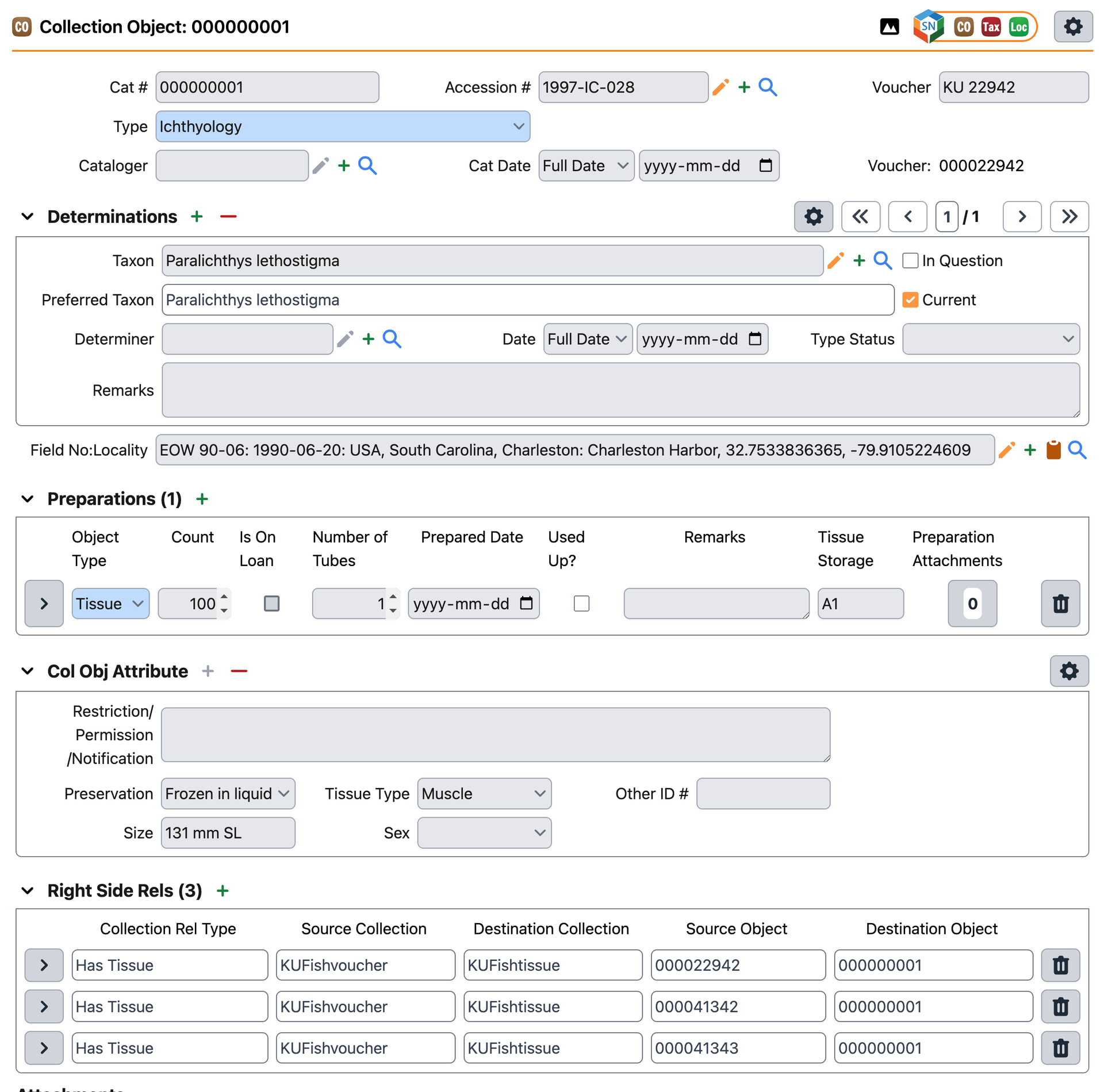
In this screenshot, I simply defined a new CollectionRelationship view definition for the discipline.
Collection Object
I added the following subview to the CollectionObject view definition:
<row>
	<cell type="subview" id="rsr" name="rightsiderels" defaultType="table" colspan="12"/>
</row>
Collection Relationship
I created a new CollectionRelationship view definition (which is what both leftSideRels and rightSideRels uses by default), which looks like this:
<viewdef name="CollectionRelationship" class="edu.ku.brc.specify.datamodel.CollectionRelationship" type="form" gettable="edu.ku.brc.af.ui.forms.DataGetterForObj" settable="edu.ku.brc.af.ui.forms.DataSetterForObj">
	<desc>The CollectionRelationship Table</desc>
	<enableRules/>
	<columnDef>10px,2px,50px,10px,2px,100px,10px,2px,100px,10px,2px,100px,10px,2px,100px,,p:g</columnDef>
	<rowDef auto="true" cell="p" sep="2px"/>
	<rows>
		<row>
			<cell type="label" labelfor="type"/>
			<cell type="field" id="type" name="collectionRelType" uitype="querycbx" isrequired="false" initialize="editBtn=false;newBtn=false;searchBtn=false" readonly="true" colspan="3"/>
			<cell type="label" label="Source Collection"/>
			<cell type="field" id="leftSideColl" name="collectionRelType.leftSideCollection.CollectionName" uitype="text" readonly="true" colspan="3"/>
			<cell type="label" label="Destination Collection"/>
			<cell type="field" id="rightSideColl" name="collectionRelType.rightSideCollection.CollectionName" uitype="text" readonly="true" colspan="3"/>
		</row>
		<row>
			<cell type="label" label="" colspan="5"/>
			<cell type="label" label="Source Object"/>
			<cell type="field" id="leftSide" name="leftSide" uitype="querycbx" isrequired="false" initialize="editBtn=false;newBtn=false;searchBtn=false" readonly="true" colspan="3"/>
			<cell type="label" label="Destination Object"/>
			<cell type="field" id="rightSide" name="rightSide" uitype="querycbx" isrequired="false" initialize="editBtn=false;newBtn=false;searchBtn=false" readonly="true" colspan="3"/>
		</row>
	</rows>
</viewdef>
I made these fields read-only so that it simply reflects the relationships, but this could be made editable if desired.

Thank you Grant, for these explanations.
However, I am still stuck in the same place. That is to say, I am unable to create a New Collection Relationship Type with two collections that are not in the same disciplines. On the form, I am unable to access the other collections.
I tried to follow the advice here
but I didn’t quite understand what exactly I needed to do. I created right and left picklists in two test collections (Paleo Collection and Historical Context), but it doesn’t work.


What should I do?
Furthermore, when I try to create a new Collection Relationship view, I can’t because an error message appears.


Hi @Marion,
but I didn’t quite understand what exactly I needed to do. I created right and left picklists in two test collections (Paleo Collection and Historical Context), but it doesn’t work.
I’ll update the original instructions to be more descriptive, but simply put:
- Create the ‘Collection Relationship Type’ record
- Log into the collection ‘Historical context’, then set it as the ‘Right Side Collection’ collection
- Log into the other collection (e.g. ‘Paleo Collection’), go back to the newly created ‘Collection Relationship Type’ record, and then search for the current collection in the ‘Left Side Collection’ relationship field.
When you try to search for a collection using the query combo box, it will only show the current collection, no other collections in the database.
Until this is faster, I’m happy to do this for you for all collections behind-the-scenes.
Furthermore, when I try to create a new Collection Relationship view, I can’t because an error message appears.
I found the cause and added it to our GitHub: Cannot create 'Collection Relationship' view definition if an Invertebrates collection is in the database · Issue #7680 · specify/specify7 · GitHub
This will be solved in v7.12.0, but for now you can either edit the form definition using the XML editor manually, or I can create this for you!
If you go the manual editing route:
View:
		<view name="CollectionRelationship" objtitle="CollectionRelationship" class="edu.ku.brc.specify.datamodel.CollectionRelationship">
			<desc/>
			<altviews>
				<altview name="CollectionRelationship View" viewdef="CollectionRelationship" mode="view" validated="false"/>
				<altview name="CollectionRelationship Edit" viewdef="CollectionRelationship" mode="edit" default="true" validated="false"/>
				<altview name="CollectionRelationship Table View" viewdef="CollectionRelationship Table" mode="view" validated="false"/>
				<altview name="CollectionRelationship Table Edit" viewdef="CollectionRelationship Table" mode="edit" validated="false"/>
			</altviews>
		</view>
Viewdef:
<viewdef name="CollectionRelationship" class="edu.ku.brc.specify.datamodel.CollectionRelationship" type="form" gettable="edu.ku.brc.af.ui.forms.DataGetterForObj" settable="edu.ku.brc.af.ui.forms.DataSetterForObj">
	<desc>The CollectionRelationship Table</desc>
	<enableRules/>
	<columnDef>10px,2px,50px,10px,2px,100px,10px,2px,100px,10px,2px,100px,10px,2px,100px,,p:g</columnDef>
	<rowDef auto="true" cell="p" sep="2px"/>
	<rows>
		<row>
			<cell type="label" labelfor="type"/>
			<cell type="field" id="type" name="collectionRelType" uitype="querycbx" isrequired="false" initialize="editBtn=false;newBtn=false;searchBtn=false" readonly="true" colspan="3"/>
			<cell type="label" label="Source Collection"/>
			<cell type="field" id="leftSideColl" name="collectionRelType.leftSideCollection.CollectionName" uitype="text" readonly="true" colspan="3"/>
			<cell type="label" label="Destination Collection"/>
			<cell type="field" id="rightSideColl" name="collectionRelType.rightSideCollection.CollectionName" uitype="text" readonly="true" colspan="3"/>
		</row>
		<row>
			<cell type="label" label="" colspan="5"/>
			<cell type="label" label="Source Object"/>
			<cell type="field" id="leftSide" name="leftSide" uitype="querycbx" isrequired="false" initialize="editBtn=false;newBtn=false;searchBtn=false" readonly="true" colspan="3"/>
			<cell type="label" label="Destination Object"/>
			<cell type="field" id="rightSide" name="rightSide" uitype="querycbx" isrequired="false" initialize="editBtn=false;newBtn=false;searchBtn=false" readonly="true" colspan="3"/>
		</row>
	</rows>
</viewdef>
Thank you @Grant for your help!
Thank you very much for offering to set it up for me. However, I prefer to do it myself because I need to understand in detail how it all works.
So, I managed to create my relationship type collection and also managed to create the form using the XML editor like you suggest.

The problem now is that I don’t quite understand how the right and left sides work…
When I open the “Right Side Rels” form, in the “Destination Object” field, it defaults to the Archive’s catalogue number (or in the XML, it is the right side). And I have no way of searching for a catalogue number associated with the Paleo collection from the form (I also tried it in the ‘Destination Object’ field, and there too I only have access to the catalogue numbers of the Archives).

It only offers me the catalogue numbers associated with the Archives.

So I tested it with the plugins. From there, it is possible to search for objects in the Paleo collection associated with this archive.

Once I’ve done that, if I click on the view logo to the right of the “Collection Rel Type” field in the “Right Side Rels” table form,

I see that four records are associated.


And if I look at these relationships, I see that in the “Source Object” field there is the archive catalogue number and in the “Destination Object” field there is the catalogue number of the associated Paleo collection object.

I must admit that I am a little lost.
Thank you again for your help.
Hi @Marion,
I am happy to clarify how the relationship sides work!
Left Side and Right Side are fixed roles defined when the Relationship Type is created. They establish the “direction” of the link.
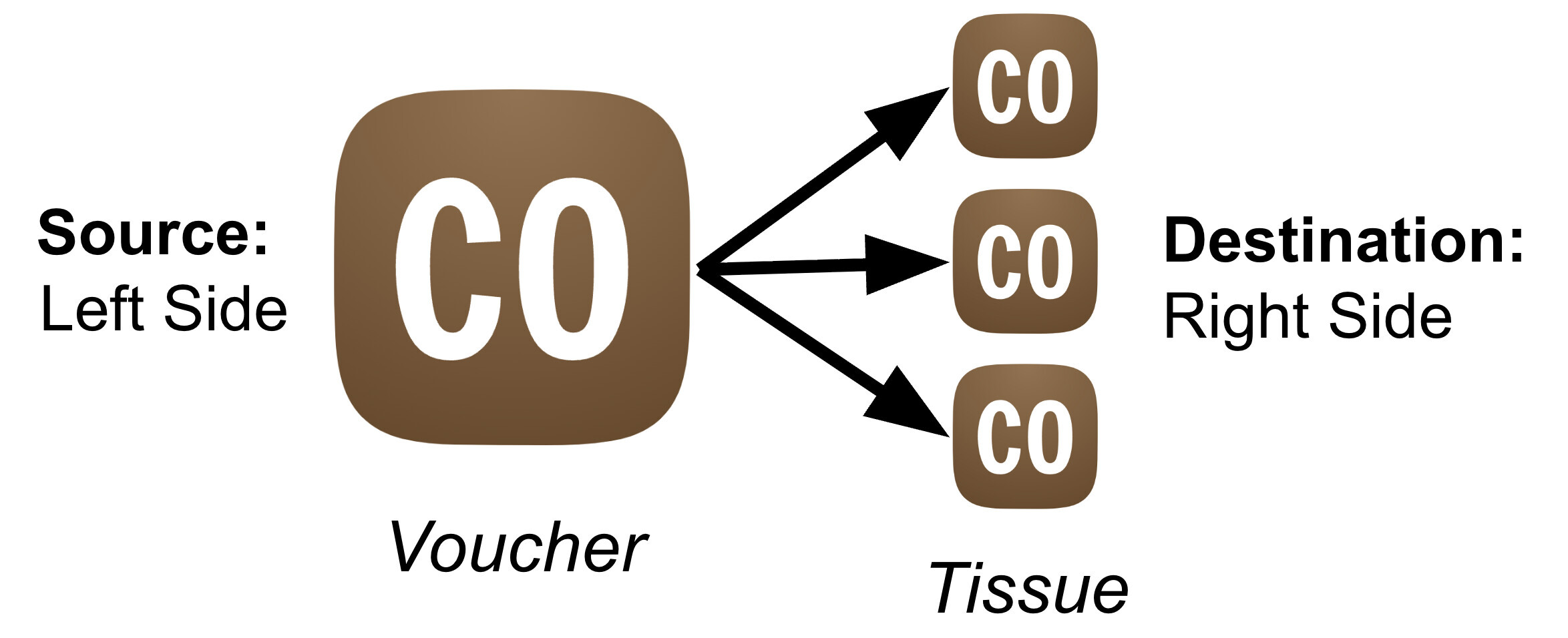
For your specific goal (linking many collections from various disciplines to Historical Context):
- Left Side (Source): Your 30 different collections.
- Right Side (Destination): The “Historical Context” collection.
How it works in practice
The “direction” determines how you interact with the relationship in the forms:
1. From the “Left Side”
When you are in a collection like DNA, you are on the Left Side. You want to create a link pointing to the Right Side (Historical Context).
- Action: You need to create the link here.
- Tool: You must use the
CollectionRelOneToManyPlugin. - Why? Standard ‘dropdowns’ (query combo boxes) in Specify can only see records in the current collection. This plugin is special since it allows you to search and select a record from a different collection (the Right Side) to bridge the gap.
You can even create these in bulk, see:
2. From the “Right Side” (Historical Context)
When you are in the Historical Context collection, you are on the Right Side. You want to see all the incoming links from the Left Side (DNA, Tissue, etc.).
- Action: You want to view the links here.
- Tool: You use the
rightsiderelssubview (like the one I provided). - Why? Since this record is the “destination” for potentially many records across 30 collections, a subview is the best way to list them all in one place. The ColRelTypePlugin only supports showing a single right side relationship (which is good for tissues and vouchers, not in this case).
Setup Summary
- Add the CollectionRelOneToManyPlugin so users can search for and attach a Historical Context record, using the ‘Collection Relationship Type’ you create bridging the two collections.
- Add the custom
rightsiderelssubview to the Historical Context forms so you can see the list of all connected specimens from other disciplines.
I hope this helps demystify the terminology a bit. Let me know if this is still not clear.
Thank you @Grant, for these reminders. They help me solidify my understanding of the theory. In practice, however, it remains confusing. Could you please read my previous message in more detail? I don’t understand how to enter data into the custom form; it’s not working.
In addition, I would like to be able to enter this data in both directions. The “DNA & Tissue” and “Historical context” collections will be the collections that are linked to all the other collections. However, each other collection will also potentially have links with entries from the “Historical Event” and “DNA & Tissue” collections.
For DNA & Tissue, this is a one-to-many relationship (one Specimen for several Tissues, for example) so your exemple is valide. But for Historical Context, it is a many-to-many relationship (one Specimen can be linked to several Archives, and one Archive can point to several Specimens). How can I do that?
Finally, how do you fill out the “rightsiderels” form? It’s supposed to be automatic, but nothing happens in the “Historical context” collection. The formular stay blank.


I created the links in the Paleo collection, but they don’t appear when I open the Historical Event collection. They only appear if I click on the eye icon.

Autofill only works if I use the form in the left collection (here “Paleo collection”).

In addition, there is a mix between the catalog numbers and the fields that I don’t understand (see my previous message and the screenshots for more details). See in particular the behavior of the Destination Object field.
Hi @Marion,
Thanks for your patience while we work through this!
When I open the “Right Side Rels” form, in the “Destination Object” field, it defaults to the Archive’s catalogue number (or in the XML, it is the right side). And I have no way of searching for a catalogue number associated with the Paleo collection from the form (I also tried it in the ‘Destination Object’ field, and there too I only have access to the catalogue numbers of the Archives).
[…]
I don’t understand how to enter data into the custom form; it’s not working.
[…]
Finally, how do you fill out the “rightsiderels” form? It’s supposed to be automatic, but nothing happens in the “Historical context” collection. The formular stay blank.
You cannot enter data into the custom form as it is meant to provide you a read-only view of the relationships. It is only the best place to see all incoming links, but not to create or edit.
Query combo boxes (like ‘Left Side Object’ and ‘Right Side Object’ can only see records in the current collection, so it is necessary to use the one-to-many plugin since it allows you to search and select a record from a different collection (the Right Side).
All object relationships need to be established through the CollectionRelOneToManyPlugin, as they cannot be established any other way (outside of the WorkBench).
In addition, I would like to be able to enter this data in both directions.
Data cannot be entered from both directions, as the relationships need to be made from the source side collection. You can have multiple ‘source’ collection links to the destination, and in the custom rightsiderels subview you should see (as read-only) all links (including the name of the collection).
I have added a feature request for this capability!
I created the links in the Paleo collection, but they don’t appear when I open the Historical Event collection.
You currently have 9 object relationships configured:


- For 8 of these:
- Source: Historical Context
- Destination: Paleo Collection
- For one of these:
- Source: DNA & Tissue
- Destination: Paleo Collection
If you add rightsiderels to the Collection Object form, it will show all cases where that record is the ‘right side’ (destination) of a relationship.
That means if you put the subview on the form for the ‘Paleo Collection’, the Collection Object MB.R.2713 would show a single relationship from the source collection:

For DNA & Tissue, this is a one-to-many relationship (one Specimen for several Tissues, for example) so your exemple is valide. But for Historical Context, it is a many-to-many relationship (one Specimen can be linked to several Archives, and one Archive can point to several Specimens). How can I do that?
The counterpart relationship, leftsiderels, shows all relationships where that record is the ‘left side’ (source) of a relationship in a single view. This duplicates the view that the CollectionRelOneToManyPlugin already has, except it shows all of these rels in a single list rather than across several plugins.
They only appear if I click on the eye icon.
The subview is defined to show a read-only preview of the record if you click the eye icon. You can configure it to show the entire record Collection Object as a subview if desired, though if you go that direction, I recommend defining a miniaturized form so it doesn’t take up too much space. If you want to go that direction, let me know!
Thank you too @Grant for your patience.
But how can I see these results in my Historical Context collection? If I can’t modify the custom form, how can I see which entries are attached to my Archive?
Does this mean that I cannot do what I want to do in Specify, i.e. see which entries in the different collections are linked to an Archive? Because it is also and above all in this collection that I want to see the connections appear. Not from the Paleo Collection, but from my Historical Context collection.
I want this result but in the Historical Context collection (not in Paleo). So far, I haven’t been able to do it. And I want to see them appear directly on the form, not via Query.

And one last question. Does that mean I need the form plus the plugin to be able to add and view the data?
Hi @Marion,
But how can I see these results in my Historical Context collection? If I can’t modify the custom form, how can I see which entries are attached to my Archive?
If you create a relationship (using the CollectionRelOneToManyPlugin) to your ‘Historical Context’ collection from another (e.g. ‘DNA & Tissue’), you can see that relationship in the rightsiderels subview as a read-only row.
So far, as in my example, you created the relationship from the ‘Historical Context’ collection (source) and linked it to the ‘Paleo Collection’ (destination), meaning the rightsiderels subview would only show that link in the Paleo collection.
If you want to see all the links coming from the current ‘Historical Context’ record, you need to add the leftsiderels subview to that form.
Does this mean that I cannot do what I want to do in Specify, i.e. see which entries in the different collections are linked to an Archive? Because it is also and above all in this collection that I want to see the connections appear. Not from the Paleo Collection, but from my Historical Context collection.
You can see all records in different collections that are linked to an Archive. It sounds like the direction of the relationships is reversed, causing that subview not to display the expected links. If you want to treat the Archive as a destination, you need to create the relationships from the source collections (‘DNA & Tissue’, ‘Paleo Collection’) rather than creating them from the Archive.
You’ll just need to decide whether the ‘Archive’ is the destination (right side), where multiple records in a collection can connect to it, or the source (left side), which connects to multiple records in various collections. Once you do, you need to create the relationships (using the CollectionRelOneToManyPlugin system or WorkBench) from the left side collection.
If you want to create the relationships from the ‘Archive’ (where it is the left side), you will want to show the relationships using the leftsiderels subview instead of the rightsiderels one. You would still need to make the connections from a separate CollectionRelOneToManyPlugin for each relationship on the form, but you could preview all relationships at once using that read-only view.
I want this result but in the Historical Context collection (not in Paleo). So far, I haven’t been able to do it. And I want to see them appear directly on the form, not via Query.
That screenshot shows you are moving in the right direction! It seems like you want to see the leftsiderels in the Historical context collection rather than the rightsiderels (since it is the source, not the destination). You can change the form definition name="" field for the subview on the Collection Object to demonstrate this!
And one last question. Does that mean I need the form plus the plugin to be able to add and view the data?
You need to use the form plugin (or WorkBench) to make the relationship between two objects. It expects that the other record already exists.
Thanks @Grant
Can you give me an example of a leftsiderels form that I can integrate via the XML editor, please? This will save me many hours of trial and error.
Hi @Marion,
You can simply replace rightsiderels with leftsiderels on your Collection Object view definition. Both use the same CollectionRelationship form.
You can even display them both on the same form!
Right Side:
		<row>
			<cell type="subview" id="rsr" name="rightsiderels" viewname="CollectionRelationship" defaulttype="table" colspan="23"/>
		</row>
Left Side:
		<row>
			<cell type="subview" id="lsr" name="leftsiderels" viewname="CollectionRelationship" defaulttype="table" colspan="23"/>
		</row>
Hi @Grant,
It took a long time, but I finally managed to get what I wanted. Thank you again for your patience.
To summarize quickly:
-
I created a collection relationship Historical context (left) to Paleo collection (right)
-
I used the form
CollectionRelationshipyou customized on the left sideleftsiderels
-
I used the collection relationship one to many plugin in the Paleo collection so that I can also link several archives to my collection object
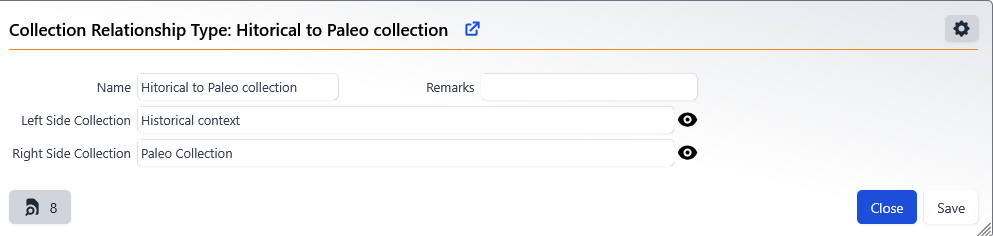


Later, I will also create a collection relationship Historical context (left) to the other collections (right).
Example: Historical → Mammals, Historical → Aves, and so on for all collections. In each collection, I will add the collection relationship one many plugin.
Thus, in the form CollectionRelationship leftsiderels in the Historical context collection, we will see all the objects from any collection that is linked to the archive.