Hello, thanks for answering.I am on v7.11.1. I did edit the XML of the form to make Chrono Strat End appear (since it was hidden). I will post the XML View Definition at the end.
Currently we are on a testing stage of Specify 7, trying out various features and capabilities of the software in order to prepare soon a fully configured version for our institution.
One thing that we care about is ths DwC export, which requires distinct chronostatigraphic fields (Start-End) in the category of Geological Context ( Darwin Core Quick Reference Guide - Darwin Core )
For example, we have fossils whose age is determined as Pliocene-Pleistocene (earliestEpochOrLowestSeries - latestEpochOrHighestSeries) or Tortonian-Messinian (similar earliest-latest Stage/Age), thus require two fields to record this information.
To determine the earliest chronostatigraphic value we use the “Chrono Strat” field, and to determine the latest chronostatigraphic value we use “Chrono Strat End”
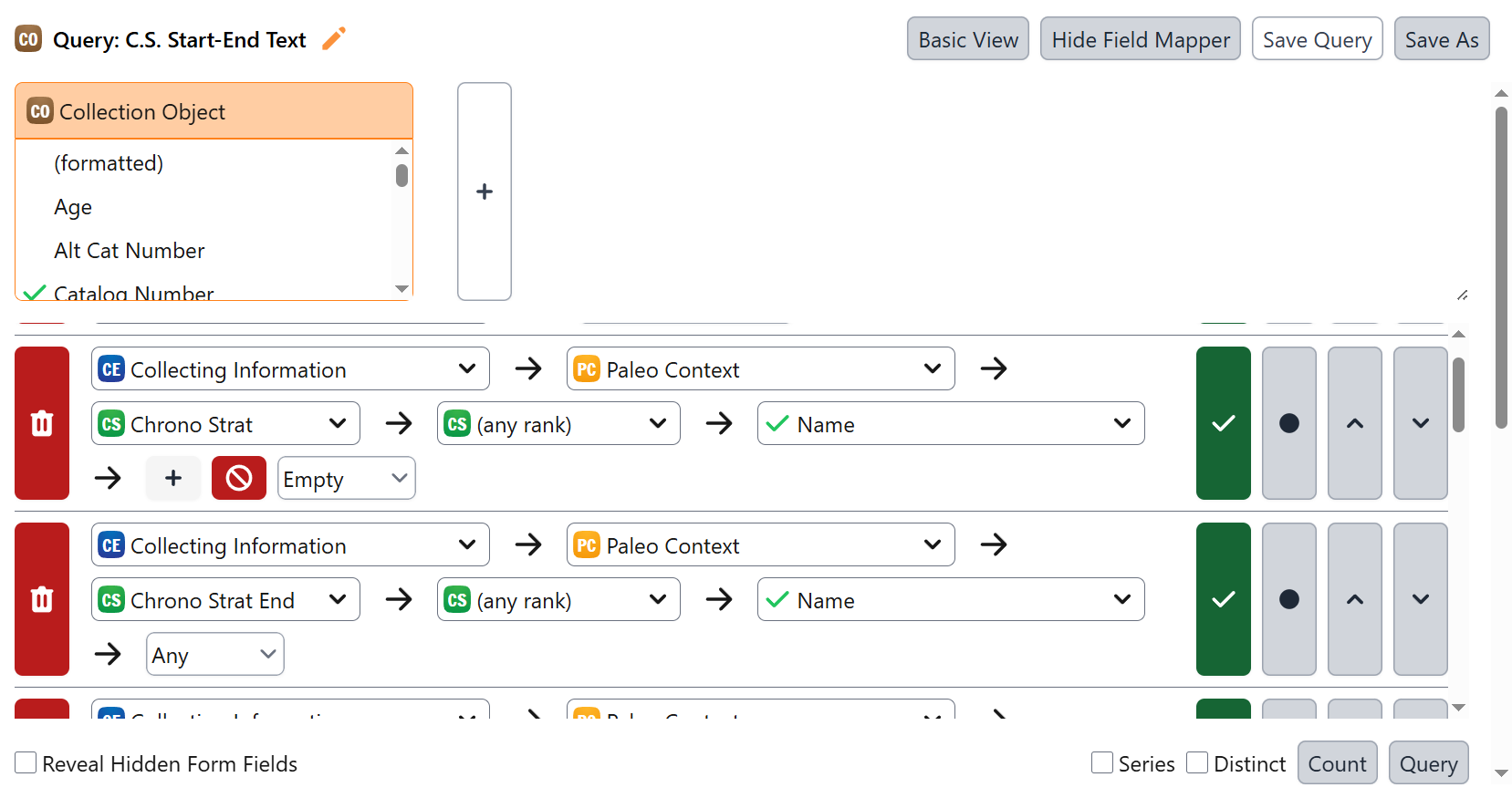
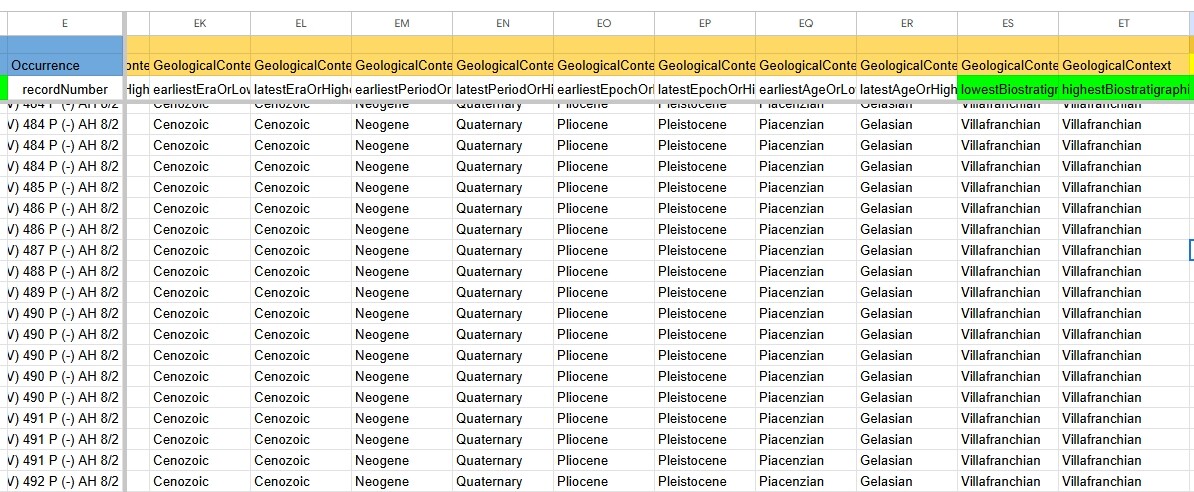
While preparing the query to export a test csv file, I fell on an interesting behavior. This can be showcased by the following screenshot, the query export itself and the csv file.
If I set the query for Chrono Strat/Chrono Strat End in “Collecting Information > Paleo Context > Chrono Strat/Chrono Strat End > any rank > Name”, it displays the correct values of the fields. However, if I instead set it into “Collecting Information > Paleo Context > Chrono Strat/Chrono Strat End > [Rank] > Name” and I choose a rank (ex. Age/Stage, Series/Epoch etc.), it only displays the value of the Chrono Strat field, for both Chrono Strat and Chrono Strat End!
Our goal is to export the full array of Chronostatigraphy (for both Earliest-Latest combinations) as displayed in the DwC Geological Context category
Thank you for your assistance
–-Export of the Query—
C.S. Start-End Query.json (10.0 KB)
–-CSV file with the query’s data—
C.S. Start-End Showcase.csv (2.6 KB)
–Screenshot showcase on how the results are displayed in the query—
–Display of Query Setup in the Query Builder’s UI—
–Desired Output of the CSV file or DwC Example—
–Paleo Context View Definition—
<viewdef name="PaleoContext" class="edu.ku.brc.specify.datamodel.PaleoContext" type="form" gettable="edu.ku.brc.af.ui.forms.DataGetterForObj" settable="edu.ku.brc.af.ui.forms.DataSetterForObj">
	<desc>Paleocontext form.</desc>
	<enableRules/>
	<columnDef>100px,2px,295px,5px,120px,2px,295px,0px,p:g</columnDef>
	<columnDef os="lnx">115px,2px,324px,5px,145px,2px,324px,0px,p:g</columnDef>
	<columnDef os="mac">130px,2px,365px,5px,163px,2px,365px,0px,p:g</columnDef>
	<columnDef os="exp">p,2px,p:g(2),5px:g,p,2px,p:g(2),0px</columnDef>
	<rowDef auto="true" cell="p" sep="2dlu"/>
	<rows>
		<row>
			<cell type="label" labelfor="pcn"/>
			<cell type="field" id="pcn" name="paleoContextName" uitype="text"/>
			<cell type="label" labelfor="3"/>
			<cell type="field" id="3" name="lithoStrat" uitype="querycbx" initialize="name=LithoStrat"/>
		</row>
		<row>
			<cell type="label" labelfor="2"/>
			<cell type="field" id="2" name="chronosStrat" uitype="querycbx" initialize="name=ChronosStrat;displaydlg=ChronosStratDisplay;searchdlg=ChronosStratSearch" isrequired="false"/>
			<cell type="label" labelfor="5"/>
			<cell type="field" id="5" name="chronosStratEnd" uitype="querycbx" initialize="name=ChronosStrat;displaydlg=ChronosStratDisplay;searchdlg=ChronosStratSearch" isrequired="false"/>
		</row>
		<row>
			<cell type="label" labelfor="t1"/>
			<cell type="field" id="t1" name="text1" uitype="text"/>
			<cell type="label" labelfor="t2"/>
			<cell type="field" id="t2" name="text2" uitype="text"/>
		</row>
		<row>
			<cell type="label" labelfor="9"/>
			<cell type="field" id="9" name="tectonicUnit" uitype="querycbx" initialize="name=tectonicUnit;displaydlg=tectonicUnitDisplay;searchdlg=tectonicUnitSearch" isrequired="false"/>
		</row>
		<row>
			<cell type="label" labelfor="4"/>
			<cell type="field" id="4" name="remarks" uitype="textareabrief" rows="2" colspan="6"/>
		</row>